Chat controls
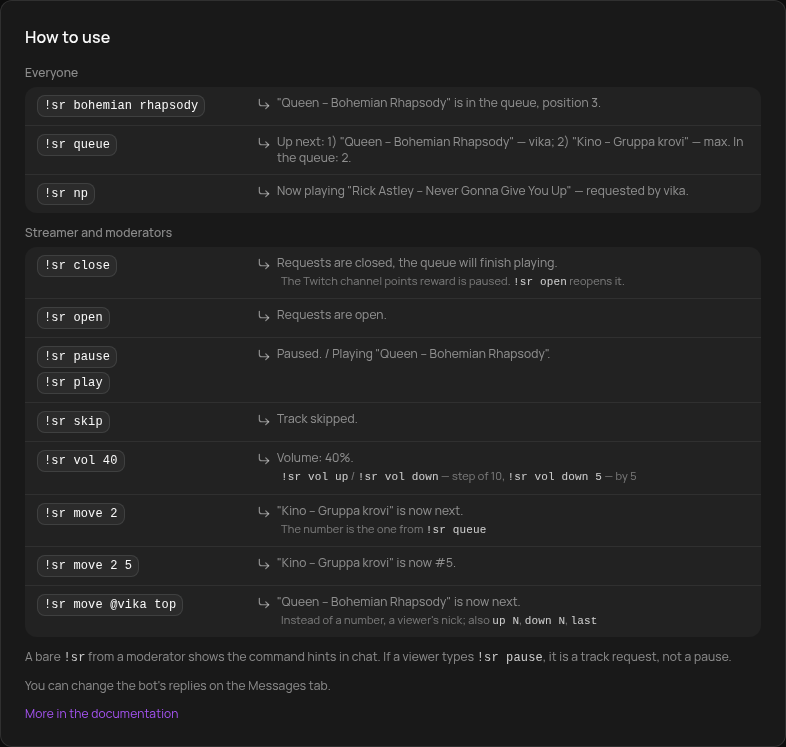
The streamer and moderators control requests and the player from chat with !sr <action>. For viewers !sr still orders a track.
For everyone
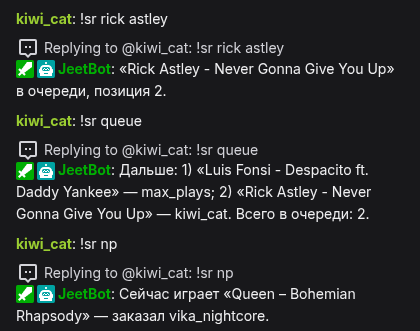
!sr queue shows the next three tracks and the total in the queue, !sr np shows what is playing and who requested it. They are the same as !queue and !np, but they work even when only !sr is enabled.
Opening and closing requests
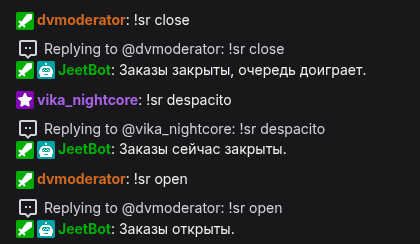
!sr close— stop taking new requests. The queue keeps playing.!sr open— take requests again.
While requests are closed, a viewer's !sr … gets «Заказы сейчас закрыты.» ("Requests are closed right now"). On Twitch the channel points reward is paused, so viewers can't redeem it. Kick has no reward pause: the bot refuses the redemption and refunds the points. The streamer can still add tracks from the dashboard.
The Accepting requests switch on the Music requests page does the same, under the title. While requests are closed, an amber "Requests are closed" bar with an Open requests button replaces the switch row under the page header. The state is shared with !sr close and !sr open.

If Twitch fails to pause the reward, the bot says so. Repeat the command and the bot tries again.
Player
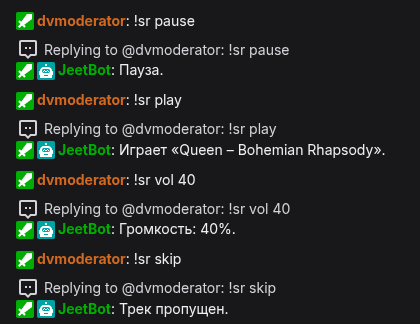
!sr play— resume,!sr pause— pause,!sr skip— skip the track.!sr vol— volume:
| Command | What it does |
|---|---|
!sr vol 40 | volume 40% (0 to 100) |
!sr vol up / !sr vol down | 10 higher / lower |
!sr vol up 5 / !sr vol down 5 | 5 higher / lower (any step) |
!sr vol +5 / !sr vol -5 | same, shorter |
The player lives in the overlay, so without it play, pause, skip and vol answer «Плеер не запущен: добавьте оверлей в OBS.» ("The player is not running: add the overlay to OBS") How to add the overlay is described here.
Queue order
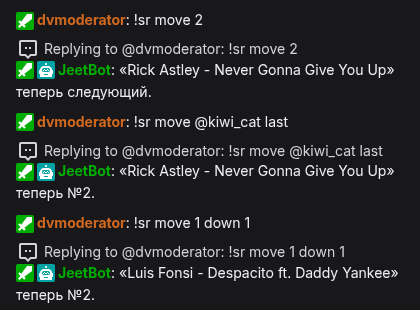
!sr move reorders a track. The numbers are the ones !sr queue shows: 1 is the next track. Instead of a number you can write @nick to move that viewer's track.
| Command | What it does |
|---|---|
!sr move 2 | track #2 becomes next |
!sr move 4 1 | track #4 moves to position 1 |
!sr move 3 up 1 | track #3 one position closer to the start |
!sr move 1 down 2 | track #1 two positions further |
!sr move 2 top | track #2 to the front of the queue |
!sr move 2 last | track #2 to the end of the queue |
!sr move @kiwi_cat last | kiwi_cat's track to the end |
Hints in chat
An empty !sr from a moderator prints a short cheat sheet of the actions. If an action keyword gets wrong arguments (for example !sr vol abc), the bot shows how to write the command and no request is made. Exception: !sr play with text orders a track, for example !sr play that funky music.
A viewer who types !sr pause or !sr skip simply requests a track with that title. The actions have no Russian synonyms.
All actions
| Command | Who | What it does |
|---|---|---|
!sr <link or title> | everyone | request a track |
!sr queue | everyone | next three tracks and the total |
!sr np | everyone | what's playing and who requested it |
!sr close | streamer and moderators | stop taking requests |
!sr open | streamer and moderators | take requests again |
!sr play / pause | streamer and moderators | resume / pause |
!sr skip | streamer and moderators | skip the track |
!sr vol … | streamer and moderators | volume |
!sr move … | streamer and moderators | reorder a track in the queue |
Every bot reply can be changed on the Messages tab, in the "Request intake" and "Chat controls (moderators)" groups, see Bot messages. The bot answers in Russian on every channel; the English in parentheses on this page is only a gloss.
Hints in the dashboard
The same examples are in the dashboard. The "Chat commands" card on the Settings tab has a "Chat command examples" block. Open the !sr command (the pencil in that card, or Commands → !sr) and the "How to use" section shows each action as "what you type → bot reply".