API data in command replies
The $(api ...) variable inserts data from an external service into a command reply. For example, the bot can show an exchange rate or game statistics. You need an API URL that returns JSON and a path to the field you want to display.
Example: USD to RUB exchange rate
Let's create an !курс command that displays the USD to RUB exchange rate from the Frankfurter API.
-
Open Commands in the dashboard, create a command, and name it
!курс. -
Paste this into the reply text:
Курс доллара: $(api https://api.frankfurter.dev/v2/rate/USD/RUB $.rate) ₽ -
Click Test to check the result.
-
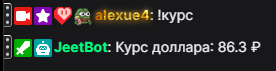
Save the command and run
!курсin chat.
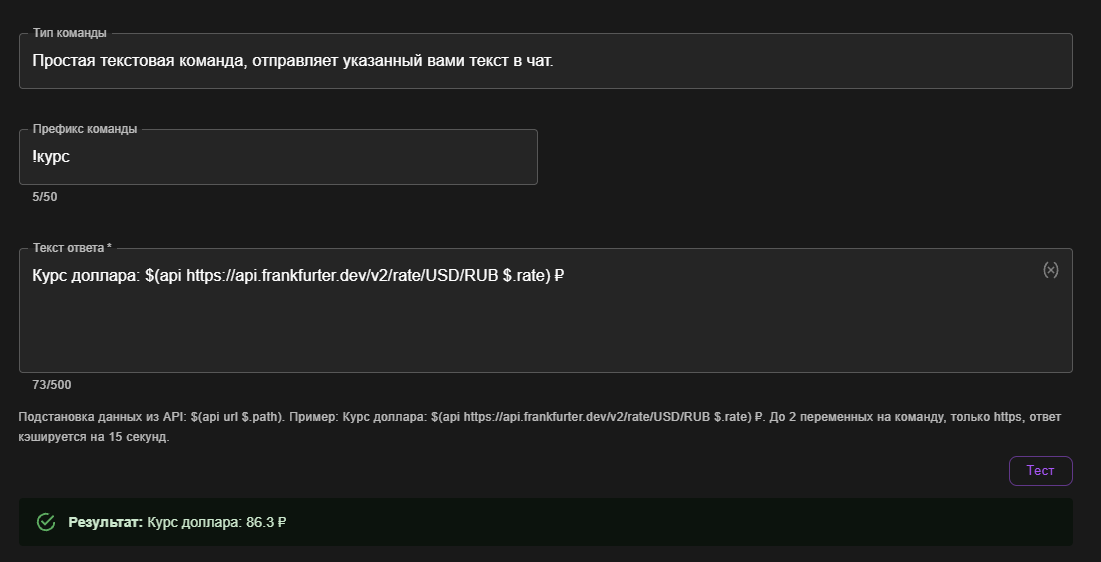
The screenshots use a Russian command name and reply: Курс доллара: 86.3 ₽ (“Dollar exchange rate: 86.3 ₽”).
Variable syntax
The general format is:
$(api URL $.path)
Replace URL with the API address and $.path with the path to the field you want. Separate the URL and path with a space.
In our example, the API returns:
{
  "date": "2026-09-08",
  "base": "USD",
  "quote": "RUB",
  "rate": 86.3
}
The $ symbol represents the entire response. The path $.rate selects the rate field, so the bot replaces the variable with 86.3 and keeps the surrounding text.
Field names depend on the API. Open its URL in a browser or check the service's documentation to find the field you need.
Nested fields and lists
Suppose another service returns this JSON:
{
  "player": {
    "nickname": "Streamer",
    "elo": 1850
  },
  "matches": [
    {"map": "Mirage"},
    {"map": "Inferno"}
  ]
}
| What to display | Path | Result |
|---|---|---|
| Player nickname | $.player.nickname | Streamer |
| Player Elo | $.player.elo | 1850 |
| Map of the first match | $.matches[0].map | Mirage |
A dot selects a nested field. A number in square brackets selects a list item, starting from zero. If a path matches multiple values, the bot displays the first one.
You can combine API variables with plain text and other command variables.
If you get an error instead of a value
«API временно недоступно» (“API temporarily unavailable”) means the bot could not obtain the requested value. The service may be unreachable, return an error or non-JSON content, or omit the field specified by your path.
Check the URL and the service's actual response. Verify field names, nesting, and list indices, then click Test again. Saving a command validates its configuration but does not guarantee that the external service is available.
After several request failures for an address, the bot may temporarily pause requests to it. If the test succeeds but chat still shows an error, try again later: this pause lasts up to 15 minutes.
Limits
- Use a direct, public HTTPS URL without redirects.
- The URL must be fixed: you cannot insert a viewer's nickname or another variable into it.
- The bot sends a GET request. Custom authorization headers and request bodies are not supported.
- A reply can contain up to 2 API variables. If a command has multiple reply variants, they can contain up to 10 API variables in total.
- Each channel can have up to 3 commands with API variables on the free tier, or 10 with a paid subscription.
- Results are cached for 15 seconds. Repeated calls during that time may return the previous value.
- The global cooldown for a command with API variables is at least 5 seconds, regardless of which viewer calls it.